
Azure Virtual Machines are the basis of the IaaS model in azure. The main scenarios where virtual machine become an ideal compute services are –
- Building new workloads – If you are building a new workload and the demand for it can fluctuate, and at the same time you need full control of your service, virtual machines are an ideal choice.
- Lift and Shift Migration – In case you are moving your applications from on-premise and there are no major changes you wish to do to the existing application, virtual machines become an ideal choice.
When in azure, creating a virtual machine, following are the basic configurations that allow you to create a virtual machine –
Project Details
Subscription – This is the billing bucket for your resource. All resources within a subscription are billed together in Azure.
Resource Group – Within a subscription there can be multiple resource groups, each of them are created for logical clubbing of resources that align to the same hierarchy together. The hierarchy can be of your choice. For example, some companies create resource groups for their departments, some create resource groups based on the importance of each.
Instance Details
Virtual Machine Name – This is the name of your virtual machine. But in azure, virtual machines have two distinct names,
- virtual machine name – This is used as the resource identifier
- host name
When you create a virtual machine using the azure portal, both virtual machine name and the host name are the same. The virtual machine name cannot be changed after its creation, however you can change the host name later on.
Region – This the region where the virtual machine will be hosted. It is preferred that you choose it to the near physical location of your business, however, there are other parameters that need to be considered as well. This is because in Azure, depending on the region, there are different options available as well. For example, the option of choosing zones is available in EAST US, however, it is not available in South India.
Availability Options – There are three availability options that are available –
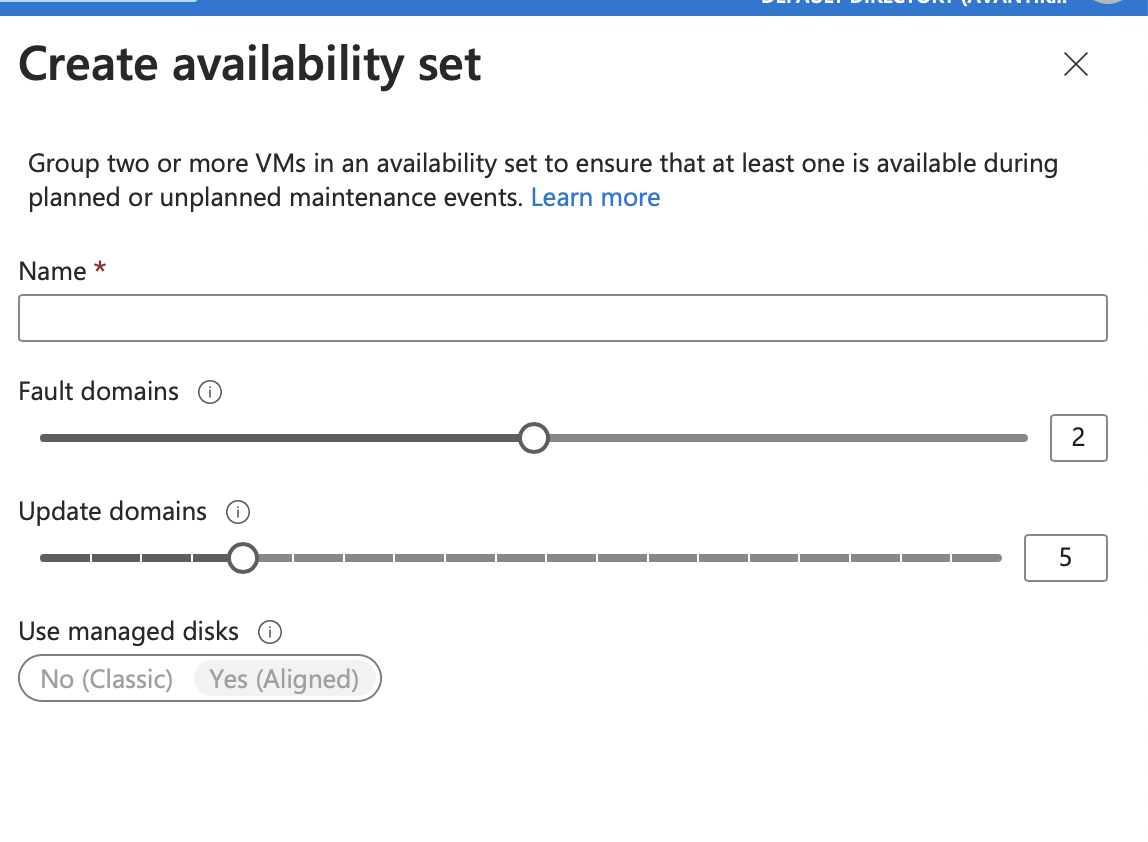
- Availability sets – An availability set is a logical grouping of the virtual machines. When you create an availability set, the following configurations are required –
- Name – this is the name for the availability set that you create
- Fault Domains – Virtual machines created in the same fault domain share a common power source and physical network switch.
- Update Domains – Virtual machines created in the same update domain will be restarted together during planned maintenance. Only one update domain is restarted at one time.
- Availability zone – An availability zone is a physically separate zone within a regions. These are created as part of the backup and business continuity strategy. For example – if one zone fails because of a failure, the other zone can be available and made use of. There are three zones available per region.
- Virtual machine scale set – Virtual machine scale sets let you create and manage a group of load balanced VMs. You can increase or decrease the number of VMs in response to your demand and there is no cost associated with the scaling up or down of the machines, the cost is for the machine only. With the help of scale sets you can provide high availability to your applications, and allow you to centrally manage, configure and update as many VMs. The scale sets can be deployed to multiple availability zones, single available zone or regionally.
Security Type – There are three options available to set the security, depending on the region again! These are –
- Standard – This is the standard security that azure offers.
- Trusted launch virtual machines – In this case, the security has additional support for TPM 2.0 ( Trusted Platform Module) and protects against other advanced attacks. Trusted Platform Module or TPM is an International standard for a secure crypto processor, a dedicated microcontroller designed to secure hardware through integrated cryptographic keys. In this security, azure enables vTPM which is a virtual TPM for the system. In this case, a virtual crypto processor is added to the virtual machine.
- Confidential virtual machines – In this security module, in addition to trusted launch, a higher confidentiality and integrity is guaranteed with hardware based trusted execution environment. A confidential VM is a type of compute engine VM that ensures that your data and applications stay private and encrypted while in use. So, in this case, even if in the worst of scenarios, the hardware gets attacked, the data and software has an additional layer of security.
Image – This is the operating system that you will be using for your virtual machine.
VM Architecture – There are two options available for this –
- x64 – x64 CPUs are fast and powerful but they require lot of electricity. So, they are used in laptops.
- Arm 64 – ARM CPUs are weak but low-power processors for smartphones and mobile devices.
Run with Azure Spot Discount – Azure offers you to build virtual machines as pay as you go model. In this case, dedicated hardware and software is allocated to you. However, when creating virtual machines, azure offers you to create them using the “run with azure spot discount”. In this case, virtual machines are created with the resources that are left over with Microsoft. So, you get the resources in discount. However, when Microsoft does need those resources back, it takes them back based on the eviction policy that you decide. There are two options available for eviction type –
- Capacity Only – In this case, when Azure’s excess capacity disappears, the virtual machine will be evicted.
- Price or capacity – In this case, either the azure’s excess capacity disappears or the cost exceeds the amount you specified, the machine will be evicted.
Eviction policy – There are two available policies –
- Stop /Deallocate
- Delete
Size – This defines the size of the virtual machine, which means the RAM that you will use and the processor you need and the cores required etc.
Maximum price you want to pay per hour (USD) – This option will reflect to you only when you have chosen the spot discount. The limit set here, is the maximum price you are willing to pay for a single instance of the selected virtual machine. While your selected price is greater than the platform price and azure has excess capacity, you will be allocated the capacity.
Administrator account
Authentication Type – Here you define whether the administrator will be logging in using a password or SSH. The SSH key is automatically generated by azure and you can use it later by saving it.
Inbound port rules
By default, the azure virtual machine created can be accessed by the virtual machines in the same virtual network, and traffic from azure load balancing. However, you can choose to set ports that are granted access.
Public Inbound Ports – This is a yes/no kind of situation. If you set it to None, you are going by the default nature of the virtual machine. in case you select the “Allow selected ports” option, you can choose the ports that can access the virtual machine.
Select Inbound Ports – Azure offers three port, SSH,HTTP,HTTPS. Choose the ports you want to give access to your virtual machine.
Please refer to Microsoft Documentation, to refer to the table on virtual machine size .
Foolishly Yours,
Avantika
 Tanubhrt.This.Side
Leave a comment