
Understanding the following code –
keyword – This is a library present in the Python module, which in stores all the python keywords for the current version of python. The library comes with two modules –
- iskeyword – This checks if the string entered is a keyword or not. If it is a keyword it returns true, else returns false.
- kwlist – This function, returns all the keywords present in the library of python at that moment!
We begin with the main function, this function is the starting point of any program! When you look closer to the code, you will find there is a try and except block! There are two exceptions defined in this block –
- Keyboard Interrupt – The Keyboard Interrupt exception — thrown when Ctrl-C, or Ctrl-Break on some machines, are pressed in a Python console window — is commonly used to gracefully break out of long-process loops, allowing your script to perform cleanup, logging etc, before exiting
- EOF Error – EOF error is expected if no data is given when calling input or raw_input.
So, using the exception block, we are trying to gracefully exit the system, in case of any errors!
When the program begins, the main function is called upon. Giving the variable choice a value of 1, means the function is going to run in infinite loops! It asks the user for the input and calls the check_keyword function.
check_keyword function is used to check if the string entered is a keyword or not. In case, it is, then the output is shown as likewise!
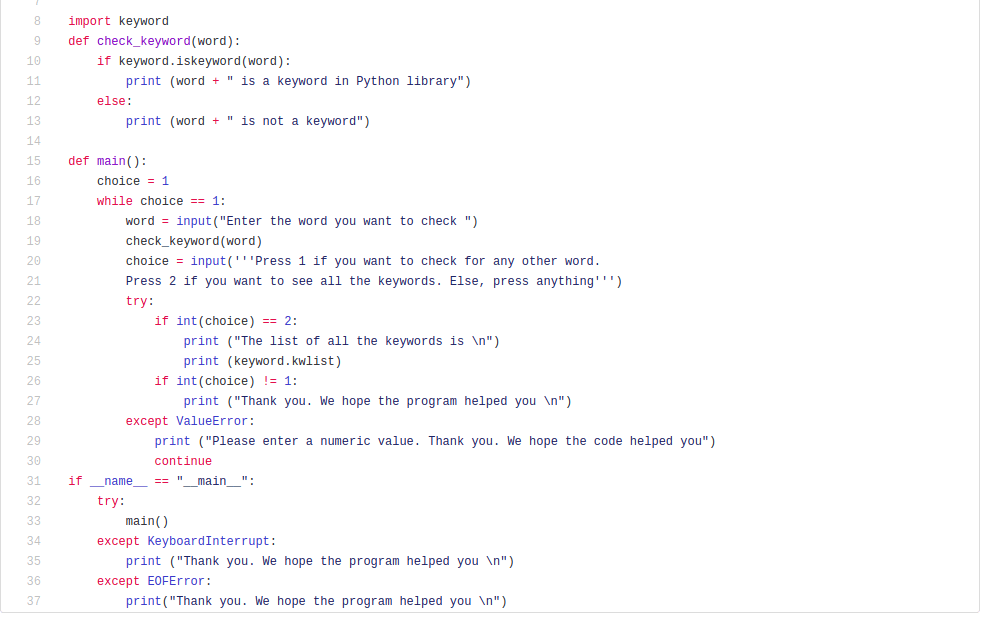
This is a simple program, to have some fun and check if the string entered by the user is a keyword or not!
Signing off,
Avantika Tanubhrt
 Tanubhrt.This.Side
Leave a comment